Digital Payment Choices With A UPI App For Everyday Use
A UPI app has become one of the most common digital payment tools for everyday transactions in India. It allows users to send money, receive payments, pay merchants, scan QR codes, manage utility bills, and track transactions through a mobile phone. For many users, it has reduced the need to carry cash for daily payments.
However, using a UPI app responsibly is important. Digital payments are convenient, but users should understand transaction limits, security practices, failed payment handling, account linking, and fraud prevention. A good payment habit is not only about speed; it is also about safety, clarity, and better control over money movement.
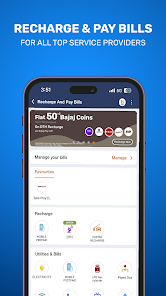
What Is A UPI App?
A UPI app is a mobile platform that allows users to make payments through Unified Payments Interface. It connects the user’s bank account with a virtual payment address, mobile number, QR code, or UPI ID. This makes money transfer possible without entering full bank details each time.
Users can send money to friends, pay shopkeepers, settle online purchases, recharge services, and pay bills. The app acts as a payment interface, while the money is debited directly from the linked bank account.
A UPI app is useful because it supports quick payments, but users should always check the recipient details before confirming any transaction.
How A UPI App Works
A UPI app works by linking a user’s bank account to a digital payment profile. Once setup is completed, the user can make payments using a UPI PIN.
Account Linking
The user selects a bank account and verifies it through the mobile number linked with the bank.
UPI ID Creation
The app creates a UPI ID or allows the user to choose one based on availability.
UPI PIN Setup
The user sets a UPI PIN for payment authentication.
Payment Initiation
The user enters the receiver’s UPI ID, scans a QR code, or chooses a saved contact.
Transaction Approval
The user enters the UPI PIN to confirm payment.
Payment Confirmation
After processing, the app shows whether the payment was successful, pending, or failed.
Common Uses Of A UPI App
A UPI app can support many daily payment needs.
Users may use it for:
- Sending money to contacts
- Paying shopkeepers
- Scanning QR codes
- Paying electricity bills
- Paying mobile bills
- Recharging prepaid numbers
- Paying broadband bills
- Settling online purchases
- Paying rent, where accepted
- Tracking transaction history
This makes it useful for both small and regular payments.
Why UPI Apps Are Popular
UPI apps are popular because they are simple, fast, and widely accepted. Many merchants, service providers, and individuals accept UPI payments. The payment process usually needs only a mobile phone and UPI PIN.
Users also prefer UPI apps because they reduce dependency on cash and card payments. A QR scan can complete many transactions within seconds. For everyday spending, this convenience can save time.
Still, users should avoid rushing while paying. Checking the amount and receiver name before entering the PIN is important.
Using UPI For Daily Transactions
In the middle of digital payment usage, upi becomes important because it allows direct bank-to-bank transfers through a simple mobile interface. Users can pay small or large amounts depending on bank and app limits, making it suitable for daily spending needs.
UPI can be useful for grocery shopping, food orders, travel payments, utility bills, subscriptions, and peer-to-peer transfers. However, users should review their bank statements and app history regularly to avoid missed or duplicate payments.
Benefits Of Using A UPI App
A UPI app can offer several benefits when used carefully.
Fast Payments
Payments can be completed quickly through QR code, mobile number, or UPI ID.
Direct Bank Transfers
Money moves directly from the linked bank account.
Wide Acceptance
UPI is accepted by many shops, online platforms, and service providers.
Easy Bill Payments
Users can pay several utility bills through one app.
Transaction History
Payment records can be checked inside the app.
No Need To Share Bank Details
Users can receive payments using a UPI ID instead of full account details.
Safety Tips While Using A UPI App
Payment safety should always come first. Users should follow basic security practices.
Important safety tips include:
- Never share UPI PIN
- Check receiver name before payment
- Avoid unknown payment links
- Do not approve collect requests from unknown people
- Keep the app updated
- Use screen lock on the phone
- Avoid public Wi-Fi during payments
- Report suspicious transactions quickly
- Do not share OTPs
- Use only official apps
A UPI PIN is only required to send money, not to receive money. This is an important safety point for users.
Common Mistakes To Avoid
Many users make avoidable mistakes while using digital payment apps.
Entering Wrong Amount
Always check the amount before confirming payment.
Paying The Wrong Receiver
Receiver details should be verified before entering the UPI PIN.
Approving Unknown Requests
Unknown collect requests may be fraudulent.
Sharing UPI PIN
No genuine person or support team should ask for the UPI PIN.
Ignoring Failed Payments
Pending or failed payments should be tracked carefully.
Not Reviewing Statements
Users should compare app history with bank statements regularly.
UPI App And Bill Payments
Many UPI apps support bill payments for electricity, gas, mobile, water, broadband, DTH, and other services. This can help users manage recurring payments from one place.
Before paying, users should check biller name, consumer number, due date, and amount. If a payment fails but money is debited, users should wait for the status update and raise a complaint if required.
Digital bill payments can be convenient, but users should still save receipts or transaction references for future use.
UPI App For Budget Tracking
A UPI app can also help users review spending patterns. Transaction history can show where money is going across food, travel, shopping, bills, and transfers.
Users who make many small payments should review weekly or monthly spending. Small transactions may look harmless individually, but together they can affect the budget.
Good payment habits include setting monthly spending limits, checking transaction history, and avoiding unnecessary impulse purchases.
Digital Payments And Financial Planning
A UPI app is mainly used for payments, but it can also support better financial discipline when users track money movement carefully. Knowing when and where payments happen can help users plan monthly expenses.
Some users also compare financial tools such as a loan calculator before making borrowing decisions. This can help estimate EMI, interest cost, and repayment impact before applying for any loan. Payment convenience and borrowing decisions should both be handled with planning.
A user should avoid taking loans only because digital access is easy. Repayment capacity, income stability, and total cost should always be reviewed first.
Conclusion
A UPI app can make everyday payments faster, easier, and more organised. It helps users send money, scan QR codes, pay merchants, settle bills, and track transaction history through a mobile phone.
However, users should follow safe payment practices, check recipient details, protect their UPI PIN, and review transaction records regularly. A UPI app is useful when convenience is combined with caution, budgeting, and responsible money management.